


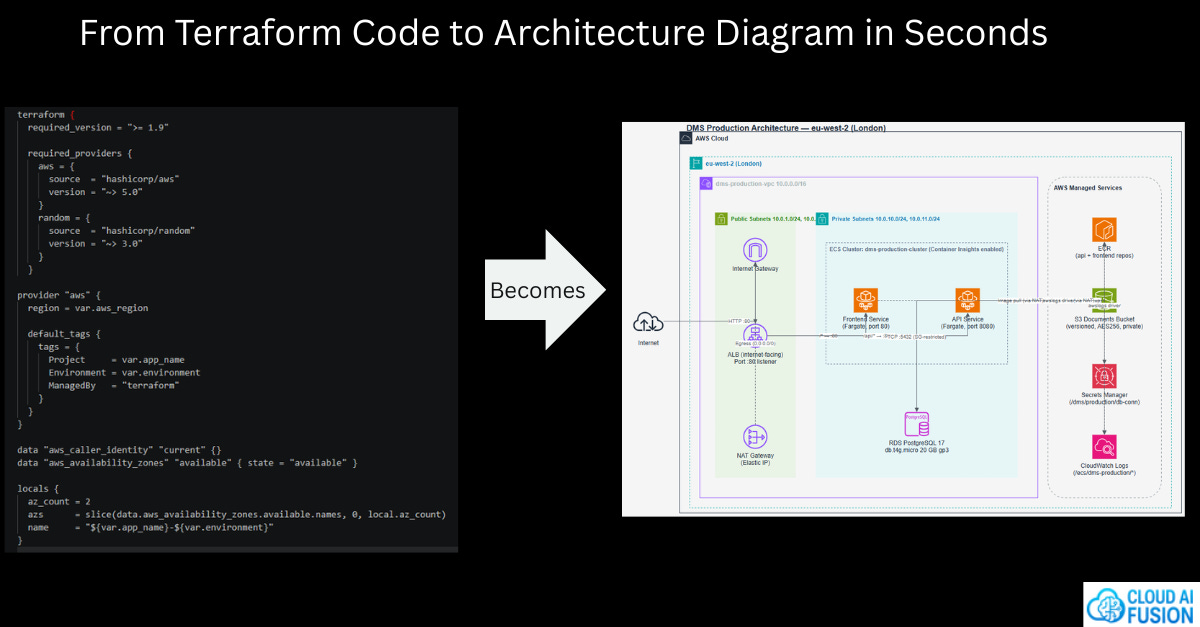
This is the first in a series exploring how AI is changing the Software Development Lifecycle — from requirements and design through to deployment and operations. My focus is practical and production-grounded: tools and patterns that actually work, not just ones that look good in a demo.
There’s a version of your infrastructure that lives in a diagram. Clean boxes, neat arrows, everything labelled the way you intended it. And then there’s the version that actually exists in your Terraform — the one that’s been through six sprints, two engineers, a production incident, and a cost-optimisation review.
These two versions start the same. They rarely stay that way.
The Problem: Architecture Drift Is Invisible Until It Isn’t
When I hand off an architecture diagram to a DevOps team, I’m communicating intent. This is what we’re building. Here’s how the components relate. Here’s the security boundary. The Terraform that comes back usually reflects that intent - at least initially.
But Terraform evolves. It has to. Requirements change, new services get added, existing resources get refactored or replaced. And crucially, these changes don’t automatically flow back into the architecture diagram. The diagram sits in a Confluence page or a Draw.io file somewhere, quietly becoming fiction.
This matters more than it might seem. Architecture diagrams aren’t just documentation artefacts - they’re the shared mental model that engineers, architects, and technical stakeholders use to reason about a system. When they diverge from reality, decisions get made on false assumptions. Security reviews miss components that have been added. Onboarding takes longer. Incident response gets harder.
The technical term for this is infrastructure drift, but the diagram problem is subtler than the classic “drift from desired state” that tools like terraform plan catch. No tool natively tells you: your diagram no longer reflects your code. You have to figure that out yourself — and typically you only discover it when it matters most.
I’ve been looking for a practical way to close this loop for a while. The approach I’ve landed on — using a Claude Code skill to reverse-engineer Draw.io diagrams directly from Terraform — is the most useful solution I’ve found.
The Tool: A Claude Code Skill for AWS Architecture Diagrams
The skill is open source, published here: 🔗 https://github.com/oharu121/oharu-commands-skills-gems/tree/main/skills/aws-architecture-diagram
The reference article that explains the thinking behind it is worth reading too: 🔗 https://dev.classmethod.jp/en/articles/claude-code-skill-aws-architecture-diagram/
What it does is straightforward but genuinely useful: it teaches Claude Code to produce two outputs - a Draw.io-compatible XML diagram using accurate AWS service icons, and a markdown file describing the architecture. The markdown alone is useful as a living summary of what your infrastructure actually contains.
Installing it on Windows takes about two minutes:
Clone the repository:
git clone https://github.com/oharu121/oharu-commands-skills-gems.gitCopy the
skills/aws-architecture-diagramfolder into your%USERPROFILE%\.claude\skills folderxcopy /E /I oharu-commands-skills-gems\skills\aws-architecture-diagram "%USERPROFILE%\.claude\skills\aws-architecture-diagram"
Give Claude Code permission to read all of the files in its skills folder to prevent it from asking permission to read reference files every time you use the skill. This is done by editing Claudes settings.json file:
notepad %USERPROFILE%\.claude\settings.jsonand adding the line:
"Read(~/.claude/skills/**)"For example:
{

  "permissions": {
    "allow": [
      "Read(~/.claude/skills/**)"
    ]
  }
}
Using it is straightforward: Prompt claude to generate an AWS architecture diagram by pointing it at a folder of Terraform files:
create an aws architecture diagram from the files in the terraform folder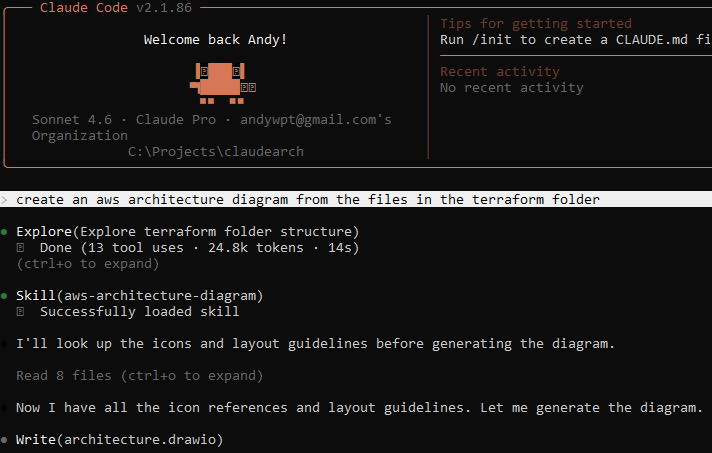
That’s it.
A Real Example: Two Audiences, One Codebase
I ran this against a set of Terraform files to test something specific: whether the skill could adapt its output for different audiences. I asked for two versions of the diagram using only a small prompt change.
Prompt 1 - non technical audience:
create an aws architecture diagram from the files in the terraform/aws folder for a non technical audience


Prompt 2 - technical audience:
create an aws architecture diagram from the files in the terraform/aws folder for a technical audience


The difference is striking. The non-technical version strips away ARNs, resource identifiers, and implementation detail - leaving a clean, readable view of the system’s shape. The technical version exposes the detail that an engineer needs: resource names, relationships, configuration specifics. Same infrastructure, two genuinely different perspectives, generated from the same prompt pattern with a single word changed.
This matters in practice. One of the friction points in architecture work is producing documentation at the right level for the right audience. Generating both from code - rather than maintaining them separately - removes a real overhead.
How I’m Incorporating This Into My Workflow
The most immediate use case for me is architecture verification. Before a significant release, or when onboarding to a codebase I haven’t touched in a while, I’ll run this against the current Terraform and compare the output against the original design. It’s not a binary pass/fail check — it’s a conversation starter. What changed? Was that intentional? Does the current state still reflect the system we meant to build?
I’m also planning to use it as part of design reviews. When a DevOps engineer proposes infrastructure changes, generating a diagram from their Terraform branch gives me something concrete to review - not just code, but a visual representation of the architectural impact of those changes. That’s a much richer review surface.
Longer term, I think there’s something interesting in running this on a cadence - generating a diagram from Terraform on every merge to main and storing it alongside the code. Not as a replacement for maintained architecture documentation, but as an automatically-updated snapshot that at least answers the question: what does this infrastructure look like right now?
Where It Falls Short
In the spirit of being practical rather than promotional: this tool isn’t magic, and it has real limits.
It works from what Terraform can see. If your architecture involves manual resources, console-configured components, or multi-repo infrastructure that isn’t referenced in the folder you point it at, those won’t appear. The diagram reflects the code, not necessarily the full system.
The quality of output also depends on how well-structured your Terraform is. Highly modular, well-named code produces clearer diagrams. Sprawling, inconsistently named legacy Terraform produces noisier output. Garbage in, garbage out - but that’s also a useful signal in itself.
And Draw.io is not everyone’s preferred diagramming tool. If your team lives in Lucidchart or Miro, you’ll need to export and convert. That’s a friction point worth noting.
The Bigger Picture
What I find genuinely exciting about this approach isn’t just the specific tool — it’s what it represents. The idea that infrastructure code can be a source of truth for architecture diagrams, rather than the other way around, is a meaningful shift. For too long, diagrams have been upstream artefacts that drift from reality. Turning Terraform into the source and generating the diagram from it inverts that relationship in a useful way.
Claude Code skills are still relatively new territory. But this use case - using an AI coding agent to bridge the gap between code and visual architecture understanding - is exactly the kind of workflow augmentation I’ll be returning to throughout this series.
If you work with AWS infrastructure and Terraform, it’s worth twenty minutes to try it. The install is trivial, the prompt is simple, and the output is immediately useful.
The Terraform files used in this example are available here: https://github.com/cloudaifusion/sdlc-automation
f you found this useful, subscribe to catch the next one.